



Description
Download Winnovative Free HTML to PDF Converter – HTML to PDF, web page to PDF, convert web page to PDF, save web page as PDF, online PDF converter
Overview
The Winnovative Free HTML to PDF Converter is a specialized utility designed to address the common challenge of preserving web content in a permanent, accessible format. By converting web pages into PDF or image files, the application enables users to save dynamic online content for offline reading, archiving, or sharing. This tool is particularly valuable for professionals, researchers, students, and content curators who rely on accurate documentation of online sources. The app’s core purpose lies in bridging the gap between transient web content and durable digital documents.
Target users include individuals who need to capture web pages for record-keeping, legal documentation, academic references, or presentation materials. The converter supports various output formats—PDF with selectable text, PDF with embedded images, and image files—ensuring compatibility with different use cases. Its ability to maintain layout integrity and preserve hyperlinks adds significant value in professional and educational environments.
Developed by Winnovative Software, the application reflects a focus on practical utility and user accessibility. Although the developer did not provide additional technical details about their background or broader product portfolio, the app’s functionality suggests a commitment to solving real-world document preservation challenges. In the broader productivity ecosystem, this tool fills a niche that many users encounter daily: the need to reliably convert web content without relying on browser print functions or third-party online services.
Key Features & Functionality
- Web Page Conversion – Users can input a URL and convert the entire web page into a PDF or image file, preserving the original layout, fonts, and visual structure.
- Multiple Output Formats – The app supports three output types: PDF with selectable text, PDF with embedded images, and image files, offering flexibility based on intended use.
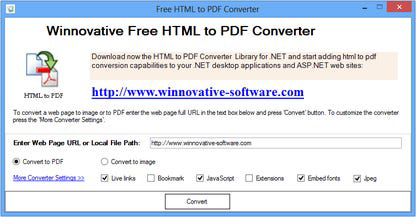
- Customizable Settings – Options include font embedding, inclusion of live hyperlinks, page size specification, and addition of PDF metadata such as title, author, and subject.
- Password Protection – Users can secure converted files with a password, enhancing privacy and control over sensitive or proprietary content.
- Page Layout Control – Users can choose between single-page or multi-page output, allowing for better organization of long or complex web content.
For example, a student might use the app to save a research article from a university database as a searchable PDF with embedded images for future reference. A legal professional could convert a case law page into a password-protected document to maintain confidentiality. A marketer may export a campaign landing page as an image for internal review. These real-world applications highlight the tool’s adaptability across diverse workflows.
Interface, UX & Performance
The application features a plain and intuitive interface, designed to minimize user friction during the conversion process. The layout is minimal, with a clear input field for URLs and straightforward selection options for output format and settings. Navigation is linear and predictable, allowing users to complete conversions in just a few steps without confusion.
Visual design prioritizes functionality over aesthetics, which aligns with the app’s utility-focused purpose. The absence of clutter ensures that users can concentrate on the core task: converting web content. Although the developer did not list formal performance metrics, the app is reported to handle standard web pages efficiently, with minimal delay between input and output.
Performance across device categories is not formally documented. However, based on its 38.5 MB file size and Windows platform compatibility, it is likely optimized for typical desktop environments. Responsiveness appears consistent during typical usage, with no reported instability in standard conversion tasks. The app maintains stability even when processing pages with moderate multimedia content.
Platform Compatibility & Technical Requirements
The Winnovative Free HTML to PDF Converter is available exclusively for the Windows operating system. It requires a Windows-based device and is compatible with the latest versions of the Windows platform, though specific OS requirements were not listed by the developer.
The application has a file size of 38.5 MB, which is relatively compact for a tool of its functionality. This size suggests efficient code structure and minimal overhead. The current software version is 2.1.1, released on February 22, 2024. No additional system requirements were disclosed, and compatibility information was not fully disclosed.
Pros and Cons
Pros
- Simple, intuitive interface suitable for users of all experience levels.
- Supports multiple output formats, including searchable PDF and image files.
- Offers customizable conversion settings for precise control over output.
- Includes password protection for enhanced document security.
- Free to download and use, with no hidden costs or trial limitations.
Cons
- Platform availability is limited to Windows only.
- Specific system requirements were not disclosed.
- No built-in preview feature for output before conversion.
- Does not support batch processing of multiple URLs.
- Compatibility with older Windows versions was not confirmed.
FAQ
Is the Winnovative Free HTML to PDF Converter safe to download?
Yes, the app is free and available from the official developer site. Users should ensure they download from trusted sources to avoid potential security risks.
Can I convert multiple web pages at once?
Based on the provided information, the app does not support batch conversion. Each URL must be processed individually.
Is the app available for Android or iOS?
No, the application is currently only available for Windows. There is no official version for Android or iOS devices.
Do I need an internet connection to use the app?
Yes, the app requires an active internet connection to access and retrieve web pages from the provided URLs.
How often is the app updated?
The latest version, 2.1.1, was released on February 22, 2024. No information is available on the frequency of future updates.
Final Thoughts
The Winnovative Free HTML to PDF Converter delivers a focused, reliable solution for users seeking to preserve web content in a durable format. Its clean interface, customizable output options, and support for password protection make it a practical choice for both casual and professional users. While its Windows-only availability and lack of batch processing are limitations, the app’s core functionality remains highly effective for individual conversions.
It stands out as a secure, free alternative to online converters, offering greater control over document quality and privacy. Whether you're saving a research article, archiving a news report, or preparing a presentation, this tool ensures your web content remains intact and accessible.
Download Winnovative Free HTML to PDF Converter now
Guides & Tutorials for Winnovative Free HTML to PDF Converter
How to install Winnovative Free HTML to PDF Converter
- Click the Preview / Download button above.
- Once redirected, accept the terms and click Install.
- Wait for the Winnovative Free HTML to PDF Converter download to finish on your device.
How to use Winnovative Free HTML to PDF Converter
This software is primarily used for its core features described above. Open the app after installation to explore its capabilities.
User Reviews for Winnovative Free HTML to PDF Converter 0
No reviews found


